Het is vervelend om gelijk te krijgen. Twee jaar geleden ging ik weg bij de VPRO: een omroep waar ik vier jaar lang als ontwikkelaar had gewerkt aan websites als HollandDoc, Geschiedenis24, Woord.nl en 3voor12. Ik had toen namelijk al het idee dat het een beetje een aflopende zaak was, die omroepen.
Ooit was de NPO er alleen als koepelorganisatie voor de omroepen. De ambities van Hagoort en mede-bestuurslid Shula Rijxman liggen een stuk hoger: de omroepen opdoeken en NPO de baas maken.
Nergens zijn die ambities zo duidelijk als bij het NPO-internetbeleid. Het internet, dat nogal oncontroleerbare medium wat eindeloze mogelijkheden biedt voor het verspreiden van audiovisuele producties. Dat blijkt een probleem te zijn voor NPO, aangezien het internet niet te controleren is. Op het internet kun je moeilijk een netmanager neerzetten, zoals bij de radio en televisiekanalen.
Helaas voor NPO zijn er op het internet niet een beperkt aantal zenders. Daarom bedachten ze zelf maar iets: het zogenaamde ‘aanbodkanaal‘: een kunstmatige schaarste van het aantal websites voor de omroepen. Elke nerd kan u vertellen dat zoiets flauwekul is: op het internet is er onbeperkt ruimte, en je hoeft niet te bedelen voor zendtijd.
Aanbodkanaal
Afgelopen woensdag kondigde NPO aan dat ze hadden ontdekt dat het internet nog veel minder ‘aanbodkanalen’ had dan ze dachten: slechts 50.
Wat dat betekent? Heel simpel: honderden sites moeten verdwijnen. Projecten als NPO Doc (voorheen HollandDoc) en NPO Geschiedenis (voorheen Geschiedenis 24) die al bijna twintig jaar goed draaien worden rücksichtlos de nek omgedraaid. Oh, en wil je graag video op je website? Dat mag niet, want daar hebben we één site voor: npo.nl. De sites van de omroepen mogen wel online blijven (want van eigen ledengeld), maar dat is vooral ‘voor de ledenbinding’.
De grap is natuurlijk dat die hele ledenbinding ontstaat door de producties die er gemaakt worden en vertoond worden op de sites. Mensen kennen de VPRO van Rembo en Rembo, de KRO van Boer Zoekt Vrouw en de VARA van De Wereld Draait Door. Die producties mogen niet meer worden aangeboden op de eigen websites want ‘het terugkijkaanbod van het archief moet centraal’ (Shula Rijxman in de Volkskrant).
Waarom dat centraal moet? In het eerder gelinkt Volkskrant-stuk wordt genoemd dat NPO “niet kan excelleren, omdat het aanbod zo versnipperd is”. Dat versnipperde aanbod is een feit op het internet: niet iedereen zit op dezelfde platforms. Dan kun je hopen dat iedereen naar jou toekomt, maar je kunt het beter omdraaien: wees daar waar de mensen zijn.
Daarnaast eist de NPO van de omroepen dat ze “meer waarde toe moeten voegen aan de bestaande sites en apps”. Beetje lastig om ‘waarde’ toe te voegen aan een website als je er niet je eigen video’s op mag zetten.
En waarom mogen omroepen dan “niet zomaar sites in het leven roepen”? Volgens de NPO is dat omdat er een grote bedreiging is: “het internet is oneindig.” Ik zou zeggen: juist dát is de kracht van het internet.
Dat al die sites moeten verdwijnen is doodzonde, maar wat mij misschien nog wel meer steekt is dat er vanuit NPO op geen enkele manier een visie is hoe dit beleid bijdraagt aan de missie van de publieke omroep. Wij, de mensen die de publieke omroep betalen, moeten het bij elkaar puzzelen uit oneliners van Shula Rijxman en Henk Hagoort in de krant. Op de site van NPO zelf staat vooral newspeak en bobotaal. Waarom NPO Doc weg moet, waarom programma’s van de omroepen niet op Netflix of YouTube mogen, echt heel duidelijk is het allemaal niet.
Het verhaal is anders dan wat de NPO probeert te vertellen in wollige oneliners: ze zijn doodsbang dat ze irrelevant gaan worden door de opkomst van Netflix en YouTube. ‘Internet-born’ mediabedrijven als Buzzfeed of Huffington Post weten heel goed hoe ze daar mee om moeten gaan: wees daar waar de mensen zijn. Zit je publiek op Facebook? Zet je video’s op Facebook. Zit de jeugd op Snapchat? Zet je nieuws op Snapchat.
Zo kijkt NPO er niet naar. Misschien heeft het er iets mee te maken dat de top slecht één lid heeft dat Abraham nog niet gezien heeft. Het bijna veertigjarige hoofd financiën werd bij haar aanstelling door Shula Rijxman “een jong talent” genoemd. Misschien dat het eens tijd wordt dat er bij NPO mensen aan de top komen die niet zijn geboren toen Swiebertje nog op televisie was.
Alle ballen op NPO
De strategie in Hilversum is, geheel tegen de tijdsgeest in, om alles naar zichzelf toe te trekken: op de eigen portal. NPO denkt te kunnen winnen van grote internetbedrijven als Google en Netflix met eigen platforms, of desnoods op een, met de commerciële omroepen opgezet, zieltogend platform als NLZiet.
Wat de NPO lijkt te vergeten is dat de producties van de publieke omroepen niet van hen zijn, maar van de Nederlandse belastingbetaler. Die heeft er geen enkel voordeel bij dat het aanbod maar op één platform aangeboden wordt. Als belastingbetaler wil ik gewoon de content zien waar het mij het beste uitkomt, dus op YouTube, of op de sites van de omroepen, of hier, op mijn eigen blog, als embed.
Ik vind dat de NPO kleur moet bekennen. Zeg het gewoon: wij willen af van die suffe omroepen en de baas zijn op televisie. Dat internet is leuk voor als je de uitzending terug wilt kijken, en verder doen we er maar niks mee, zeker niet als je publiek van onze portal weglokt.
Laat ik daar dan iets tegenin brengen: misschien klinkt het achterhaald en archaïsch, maar ik vind de ouderwetse publieke omroep best een goed idee. Crowdsourcing avant la lettre. Iedereen betaalt een vast bedrag per jaar, daarvoor krijg je een supergevarieerd groot aanbod van televisie, radio en internet. Het is publieke financiering op z’n best. Als je maar genoeg mensen vindt kan iedereen een omroep beginnen. En ondanks dat ik moet kotsen als ik Pownews op televisie zie ben ik toch blij, want dat is precies waar de publieke omroep voor is: iedereen een stem geven.
Best een tof systeem, toch? Iedereen betaalt een beetje geld, en we maken fantastische radiodocumentaires, briljante televisieprogrammas, vernieuwende websites. Voor iedereen te bekijken. Gratis. Zonder dat je pornobanners hoeft te ontwijken van de Pirate Bay, of eeuwig moet zoeken op YouTube, of een tientje per maand moet betalen voor Netflix. Dat het daar toevallig ook op staat en geld oplevert voor nieuwe producties is dan mooi meegenomen.
Nee, als de publieke omroep verdwijnt vergaat de wereld niet, en mensen stoppen niet opeens met het maken van nieuwe producties. Maar het is wel jammer dat we plekken hadden waar jonge makers ideeën konden uitproberen. Organisaties waar mensen konden experimenteren. Je weet wel, omroepen, dat idiote idee uit het verzuilde Nederland van de jaren vijftig. En ook nog een van de goedkoopste van Europa.
Dat is nou precies het verhaal wat we niet horen van NPO. Het enige wat we horen is dat er een hoop weg moet, want dat is beter. Maar tot ze duidelijk kunnen maken waarom dat beter is ben ik voor de ouderwets goede Nederlandse publieke omroep.
Ja, daar zijn we weer. Weer een jaar voorbij, dus het kan niet anders dat ik hier (voor de 11de keer inmiddels) een lijstje met de beste muziek presenteer van het afgelopen jaar.
Maar eerst iets anders. Op 29 november overleed een van mijn grootste muzikale helden: Luc de Vos, de zanger van Gorki, from Belgium baby. Ik zeg niet snel dat ik fan ben van iemand, maar van de Vos en zijn band was ik dat zonder enige twijfel. Sinds Eindelijk Vakantie (2000) volg ik zijn werk, en eerlijk gezegd heb ik zelden een slecht Gorki-nummer gehoord. Sterker nog, ik durf wel te stellen dat er geen betere muzikant was binnen het Nederlands taalgebied. In maart 2014 zag ik hem nog fantastisch spelen in de Helling in Utrecht.
Het enige positieve is dat zijn muziek voor eeuwig zal blijven. En misschien dat er door zijn dood meer mensen zijn muziek ook zullen horen, en dan ontdekken dat hij zoveel meer heeft gemaakt dan alleen Mia.
Goed, genoeg nare zaken. Door naar het lijstje.
In tegenstelling tot 2013 vond ik 2014 een beetje tegenvallen. Weinig wow, veel ‘best aardig’. Alles na nummer vijf in dit lijstje valt in beetje in die laatste categorie.
Achter elk album staat een Spotify-icoontje wat naar (verrassing) het volledige album op Spotify verwijst.
The War on Drugs – Lost in the Dream
Cloud Nothings – Here and Nowhere Else
Spoon – They Want My Soul
Run the Jewels – Run the Jewels 2
Future Islands – Singles
Caribou – Our Love
Aphex Twin – Syro
Toumani Diabaté – Toumani & Sidiki
Marissa Nadler – July
How To Dress Well – “What is this heart?”
St. Vincent – St. Vincent
Arca – Xen
Metronomy – Love Letters
Röyksopp & Robyn – Do It Again
D’Angelo – Black Messiah
Lykke Li – I Never Learn
Sharon Van Etten – Are We There
Grouper – Ruins
FKA twigs – LP1
Eno & Hyde – High Life
Zoals elk jaar heb ik ook weer een YouTube mix gemaakt met de beste liedjes van bovenstaande albums, inclusief de liedjes waar de albums het niet van gehaald hebben:
Dan hebben we ook nog het beste optreden van het afgelopen jaar. Dat was uiteraard het briljante optreden van Future Islands in de Melkweg. De sublieme performance bij David Letterman (in de mix boven) was nog maar een voorproefje, het optreden was nog veel opzwepender. Bij het laatste nummer werd zelfs gestagedived en klom iedereen het podium op:
En last but not least: de heruitgaves. Als rereleases ook zouden meetellen voor het lijstje zou met stip bovenaan de Nigeriaanse disco-funk artiest William Onyeabor hebben gestaan met de heruitgaves van zijn synthesizer muziek uit de jaren zeventig en tachtig zoals het briljante When the Going is Smooth & Good.
Naast Onyeabor was een andere noemenswaardige heruitgave uit de jaren tachtig die van de Canadese croonerLewis:
Update: Telegram Desktop version 1.3.8 added an option to export all your data as either a set of HTML files or a JSON file. This was added to comply to the European GDPR directive. I’ve tried this out and it works as promised and is now definitely the easiest option to export your data. Thanks European Union!
This article is kept for archiving purposes but the methods outlined probably shouldn’t be used anymore.
Note: i’ve updated this article in april 2016 with a new method that’s still clunky, but works a little bit better.
Considering that WhatsApp was sold in February 2014 to Facebook for a petty $19 billion dollars you might have looked around for alternatives. Currently the most promising messaging client is Telegram, an alternative mostly financed by Pavel Durov, who ironically founded Facebook’s biggest competitor in Russia: VK.
Now some people might suggest switching from WhatsApp to Telegram is simply trading one evil (Facebook) for another (VK). However, Durov has nothing to do with VK anymore and the people behind Telegram say they respect your privacy. Telegram is mostly open source as well. Time will tell if Telegram can stay true to their promises.
Anyway, one missing feature (the only one, in my opinion) is the ‘export chat’ option that is available on WhatsApp. I’m not that interested in transferring messages between devices, but i do think it’s important to have an export of your digital history, whether it’s e-mail, instant messaging or your tweets.
There are multiple feature requests for the various (semi) official apps, but currently there doesn’t seem to be a simple solution.
Anyway, i found a hack, but unfortunately it’s pretty technical and not for those afraid of the command line. Unfortunately it’s only for Linux and Mac systems as well.
Basically you’re using a combination of the command line tg command and a Ruby script called telegram-history-dump. Used in conjunction, you get a set of JSON files that you can further process, for example using a Python script that compiles it to a CSV file you can open in Excel. Here’s something i wrote for that.
Here’s what you should do:
Open up a Terminal and follow the instructions to install tg for your operating system. On my MacBook with Yosemite i needed this ugly hack to properly install the brew dependencies. On El Capitan i ran into countless other problems including something where i actually needed to comment out some C code in a source file. Following the instructions in this issue solved it for me.
Now run tg (bin/telegram-cli) and follow the steps to get an activation code.
Follow the instructions to install telegram-history-dump. The default configuration worked fine for me.
Run the script from the command line. This will get you a map of JSONL files that contain your precious messages.
You could try and run my python script to get CSV files for easier viewing.
Alternatively, if you don’t want to run the telegram-history-dump script for some reason you could also try these steps with just tg:
Run the command contact_list to get an overview of all your contacts.
Use the command history to get the chat log. The first argument is the name of your friend (note that tg offers tab completion!), the second one is the number of messages. There doesn’t seem to be a setting for ‘all messages’ so simply pick a high number, e.g.:
history My_Friends_Name 10000
tg doesn’t offer a way to export the history to a text file, so you either need to copy-paste the stuff from the terminal or save the terminal output to a file (the last option works best for the OS X Terminal).
Note that history also works for groups. There is no groups_list command, but using dialog_list will also show groups.
Repeat for every user and/or group you want to export.
I know, this is all pretty clunky. Hopefully the people at Telegram and/or the coders who create the clients will create a better export option in the future.
It took me ages to figure out how to run a regular Python Flask app on an Ubuntu installation ‘in production’. I thought it would be as simple as with PHP: simply copy some files over to /var/www/whatever, create a nginx config file. service nginx reload, and it works.
Except that it doesn’t. Python is a bit more complicated. This blog post simply indicates what i did to ‘get things done’, it can probably be done much easier and simpler, so if you think these steps could be improved, please leave a comment.
Here’s roughly what needs to be done. I expect that you’ve already got a few things up and running:
nginx with virtual hosts
Ubuntu / Debian
Python
uWSGI (try apt-get install uwsgi-core)
All necessary modules like Flask.
Okay, so here’s what you need to do.
Your app should have a `uwsgi.ini` file that looks like this:
When i’m not building stuff for the web, I play Minecraft. In a moment that can only be described as ‘temporal insanity’, my girlfriend and I decided to build her employer, the Netherlands Institute for Sound and Vision, full-scale in Minecraft. To answer your first question: yes, that was quite a lot of work. Around 40 hours of our shared free time i guess.
Coincidentally, a few weeks later Sound and Vision organised the Retro Game Experience at their premises, so what could be a better use for our hobby project than to have a virtual recreation of the museum in the museum?
So, for three days we had this huge screen where people could play Sound and Vision in Minecraft. Here are a few things I learned from that experience.
Reaction to the game varied broadly between age groups. Young children (between 5 and 10) were mostly interested in demolishing stuff and killing the restaurant chef. They were pretty disinterested in the fact that the building was re-created in Minecraft. Some even totally left the building and started projects of their own. Of course, there were some notable exceptions that dutifully set up their own office or put in villagers representing their entire families.
Older children from 10 to 16 reacted completely different, they were very enthusiastic and highly valued the work that went into the project. They also showed me stuff that I didn’t actually knew could be done in Minecraft, such as naming villagers by putting a spawning egg on an anvil (see the Minecraft wiki for more info). We even let one exceptional Minecraft wizard build the Sound and Vision pond and fountains in the ‘master’ version, since he could not accept the fact that we hadn’t finished that part yet.
Perhaps not surprisingly, the number of boys interested in the game far outnumbered the girls.
Interested adults were mostly employees that wanted to see their own office, or who had children that played the game.
Many children only had experience with playing Minecraft on a tablet, and needed some basic instructions how to operate the Desktop version. The same was true for many adults, but where the children usually understood the basic controls in a minute, many adults had much more trouble navigating around the world. Also, most adults didn’t how to pronounce the game and called it either Mindcraft or Mycraft.
I sat next to the game for most of the time, instructing people (well, mostly kids between 5-15) and making sure all the kids that queued up got a chance to play.
Some of the more technical things I found out that might be of use if you consider to have a Minecraft display in your museum:
Using Minecraft Realmsfor this purpose was mostly useless. I thought it would be cool that I could walk around in the building at the same time as the visitors, but Realms has some pretty hard limits on how many times you can upload and download a world. After three downloads you need to wait for 72 hours before you can download again. Also, the fact that you’re getting kicked out after ten minutes of inactivity gets irritating pretty fast.
So, actually the easiest way to have the thing operating is simply to run it locally in single player, keep a backup of the original world, and restore that every few hours. You can do development at the same time on a local laptop, and copy the new version every few hours.
Minecraft is a complete timesink, especially for children, so make sure the museum is ok with having the kids being glued to the screen instead of looking at your collections.
Having a huge TV screen for the game is pretty awesome. We had the luxury of a 65″ screen.
Leaving the game alone for an hour did lead had some interesting consequences:
The personnel at the entrance was replaced with horses.
A complete section of the offices were demolished by fire.
There was a quite a rabbit and horse problem in the restaurant.
The general manager was eaten by a zombie.
A rollercoaster was built in the main entrance hall.
All in all, I think it was a nice experiment and showed that having a Minecraft setup in a museum can be both an entertaining and interesting experience for your visitors. Perhaps it can even be used to ask kids to suggests improvements for your museum in your virtual Minecraft version, although you would need to spend countless hours first to recreate the actual building.
Since the advent of the internet many GLAM’s (Galleries, Libraries, Archives and Museums) seem to be struggling with the same issue: what’s the best way to publish data online in a format that can be easily used, reused and linked to?
Because the W3C is a non-profit organization it is of little surprise that many GLAM’s see these technologies as the logical solution to their problems.
Although the intentions of the W3C are good i don’t think the solutions as envisioned by the W3C are the best match for GLAM’s. Frankly, the proposed technologies are mostly of little to no use for most GLAM’s at all. Let me explain why.
A solution looking for a problem
Here’s the main problem: the semantic webtechnologies are solutions looking for a problem. Instead of a solution for an actual problem (how can GLAM’s make their data easily available on the web?) the semantic web repurposes mostly obsolete technologies under the new moniker of ‘linked open data’ as the silver bullet to every technological problem.
Why are these technologies useless? Here’s the simple reason: how many succesful ‘semantic’ projects can you name that have broad adoption, not only with GLAM’s, but also at other web projects?
Well, i actually know of a few. But they’re not the ones advocated by the W3C.
Here’s one: Open Graph, also known as ‘the Facebook tags’, is a way to annotate a webpage with some simple metadata, like a thumbnail image and a type (such as ‘video.movie’). It’s widely used, by almost 50% of all shared webpages.
Do webmasters add these tags because they want to add ‘semantic meaning’ and ‘linked data’ to their websites? Of course not, they simply want to have a thumbnail and a proper description whenever somebody shares their pages on Facebook.
So, why does Open Graph works where the semantic technologies fail? It’s very simple: it solves a problem. Given that it’s very easy to implement and the #2 website in the world actively supports it is probably a reason of its success as well.
The hell of XML
Here’s another problem with the semantic technologies. All of the semantic technologies are based on XML, and developers hate XML.
So, what do developers want? Developers simply want what we all want: something simple and easy that works most of the time. That’s why virtually all new API’s have settled on JSON as the best data format instead of XML.
Yes, there are semantic formats in JSON, such as JSON-LD. Unfortunately, the origin of the format, which is XML, is clearly visible in the ‘translated syntax’, which is still unwieldly and unnecessary verbose.
The semantic technologies are tricky to implement, so highly skilled developers are necessary. Unfortunately most GLAM’s don’t employ those in abundance. GLAM’s that actually build their sites ‘in-house’ are a minority, they usually outsource to external web developers. Do you think the nerds there have ever heard of OWL or SPARQL? Nope. But they do know how to parse JSON and do HTTP calls for sure.
Standards and the W3C
But, the semantic web standards are written by the W3C, the place of Sir Tim Berners-Lee, the inventor of the world wide web, surely it must be good?
Unfortunately, most of the standards the W3C develops have little practical use on the ‘real web’. You know HTML5, the standard that gave us useful things like native video and app-like features on the web? None of that came from the W3C. If the W3C would have it their way we would be writing strictly valid, non-backwards compatible XHTML (HTML written as XML). And it probably meant we’ll still be living in the dark ages of Flash and Silverlight to get real stuff done.
On the web, new technologies are usually taken up within months of release. Everything that hasn’t be widely used for a year or two is considered ‘legacy’ (think Flash or Silverlight again).
Look at the semantic technologies again in that context: the first version of the RDF spec is from 1999, OWL is from 2002. How many interesting posts on OWL or RDF do you think are posted on heavily visited developer sites like Hacker News?
Misconceptions on webservices
Another thing that most people propogating semantic web technologies tend to forget is that making a webservice (such as an API) work properly is hard work. It doesn’t come for free with your technology.
This means that your service:
Should be fast and responsive, even with many people using it at the same time
Obviously all of my ranting serves little purpose if i don’t give you an alternative. Most of the principles of the linked data movement are actually good, but the implementation is where the wrong decisions are made.
The most frustrating aspect of the whole ‘everyone should use semantic web technologies’ is that organizations are spending money on useless technologies like triple stores where they could be spending it on stuff that’s actually useful.
Actually, the very first thing you should do is take a hard look at your website, not at the data behind it. Developers are one of your customers, but your very first priorirty should be your regular customers.
So think of the visitors to your museum, or the people in your library. Can they view your website properly on their smartphones? Does the site load fast enough (that means, under 3 seconds)? Is everything easily findable? Are the texts up-to-date? What about the design?
If your website still looks like it’s 1999, maybe it’s time to update that instead of thinking about the ideal world of SPARQL endpoints and structured RDF.
Actually, rebuild your website as the first customer of your API. They can be developed in a tandem, and your webdevelopers will give you invaluable feedback on the use of your API.
Putting it into practice
So, let’s get back to your API. Let’s take the vision of linked data according to Wikipedia:
(…) a method of publishing structured data so that it can be interlinked and become more useful (…) to share information in a way that can be read automatically by computers.
Here are a few things you can do to get to that vision:
Permalinks
Have permanent URL’s to your items. If you have a website with paintings don’t have an URL like
Don’t laugh, that’s an actual link. Here’s a better solution:
http://www.musee-orsay.fr/work/000747
Machine-readable data
Offer some kind of machine readable data. If you don’t have the money to develop a full-fledged API that’s fine, CSV dumps are better than nothing.
If you are building an API, at the most basic level, something like
http://www.musee-orsay.fr/work/000747.json
Is okay. If you can deliver a ‘real’ API, that’s cool too. Make it simple. Don’t force people to use an API key. You want to offer a search option? What about something like:
http://api.musee-orsay.fr/search/?q=rembrandt
JSON
JSON should be the only output format. Everybody is doing it. So can you. You really don’t need a XML schema. Nobody will use it. Not quite sure how to translate your existing XML schema to JSON? Take the JSON output from the Europeana API as an example.
Documentation
Instead of trying to shoehorn your data in some metadata format put all your effort in documenting your metadata fields. Your ‘format’ field includes width and height of a painting, but it could also include ‘jpeg’? Fine, tell us about that weird stuff.
Code
If the only way you can deliver documentation on your website is in the form of a PDF file you’re doing it wrong. For developers the main place where they find code and documentation is Github. If you’re writing an example library for your API this is also the place to host it. You can also use Github pages to host your documentation. For a nice example view the Rijksmuseum API docs and their Github profile.
To conclude
Thanks for reading this article. If you think it’s useful, please share it using your favourite medium. Remarks or questions? Add a comment. And for more rambling about stuff like this, follow me on Twitter.
Stubbs is a 16-year old cat from Talkeetna, Alaska. Apart from being a resident, he’s also the mayor of the 876 residents of the little town. A bit weird perhaps, but apparently in the USA cats are smart enough to govern a town.
I found out about the existence of Stubbs through Wikidata, more specifically using Magnus‘ WikiDataQuery. It’s a fun tool to query the almost 15 million items available there.
My query was pretty simple: give me all items that have a ‘position held’ of ‘mayor’ and are not an instance of ‘human’. Turns out there’s actually one other non-human mayor in Wikidata: Samwise Gamgee, from Tolkien’s Lord of the Rings.
I admit that querying Wikidata for non-human mayors might not be the most useful thing in the world, but it shows that the system works and can lead to interesting facts.
The last few weeks i’ve been dabbling around with Python. I’m busy doing some experiments with OpenCV, and because it has Python bindings it seemed like a good excuse to dive a little bit more into Python.
Here are some of my observations, from somebody with a background in mostly frontend jobs, usually Javascript/Node.js and/or PHP.
Good
Python is mostly readable after a few months of not looking at it. I know the language is designed to do this, but it’s still pretty amazing when you dig up a script from a few months back and you don’t feel like reading Finnegan’s Wake.
Things usually do what they should do. There’s little confusion over methods. Getting the contents of a file is simply f = open("file.json").read()
The module system is easy enough to not overload with boilerplate when writing simple scripts, but powerful enough for writing large applications. It’s even easier than how Node.js does it, no module.exports, simply define functions, import the module and Bob’s your uncle.
It’s a small thing, but it pleases me that writing def is shorter than function in PHP/Javascript.
Package support is a lot better, it’s like the Mac app rule: packages simply seem better, especially if you compare it to the awfulness that is NPM modules (esp. in regards to documentation). Most packages seem written with the fact in mind that other people than the original coder are going to use it.
Python seems to strike a nice balance again between readability and longevity in the method names. It’s simply file.read, sys.exit. It’s a lot better than the confusing short PHP method names (srtolower vs nl2br) and the boring long Java methods (FileProcessingDecorator, readMultipleLineStrategy or whatever).
Even though i’ve read otherwise, for most of my uses, Python is fast enough.
Googling for common questions virtually always leads to a relevant, well written StackOverflow post.
Debugging seems easy. Most errors are readable and you never get the awful ‘white page of death’ like in PHP.
The internal help method is awesome, especially when combined with the powerful REPL. I love the fact that import mymodule even works in the REPL and you can do little tests and experiments.
Could be better
The documentation is not very good, especially compared to PHP. Reading the Python docs feels more like reading a language spec than something that helps you solve problems. Especially, there’s a lack of simple and clear examples. If i want to know something i usually Google something and end up at StackOverflow. That shouldn’t be the case. Even the Node.js docs seem more readable.
Here’s an example. Let’s say i want to know how to do the Python equivalent of PHP’s foreach. The docs about the for statement say this:
The for statement is used to iterate over the elements of a sequence (such as a string, tuple or list) or other iterable object:

for_stmt ::=  "for" target_list "in" expression_list ":" suite
      ["else" ":" suite]
Right, so what does that mean? What’s ::=? What’s an ‘expression list’?
The expression list is evaluated once; it should yield an iterable object. An iterator is created for the result of the expression_list. The suite is then executed once for each item provided by the iterator, in the order of ascending indices.
“Ascending indices”? “Suite”? This might be clear for a CI professor, but it’s not for the mere mortals that read the docs and want to get stuff done.
And after reading this section i still don’t know how to do foreach in Python :(
Nice that the search works on the offline download though.
‘Variable hiding’ is confusing. I realise you shouldn’t be using def or if as a variable name, but because of ‘variable shadowing’ stuff like type or id might also not your best choice for a variable name, even though it makes a lot of sense. The convention seems to be to put an underscore after the variable (type_ or id_) but that looks like a clunky hack.
Adding to that, having modules in a directory that have the same name as a module give really weird error messages. For example, try naming a module stat.py and then run python.
lambda syntax seems somewhat…funny. Why can’t we have multiple-line lambda’s (yes, i know that’s why). For now, defining a function in a function and returning that feels like a kludge. Especially when doing anything complex with map or filter this is irritating.
Why can’t we have dot access to members of a dict? Writing dict[“instruments”][“guitar”] instead of dict.instruments.guitar because boring pretty fast. Furthermore, the difference between dicts, tuples, objects and what works as an options object in a function is confusing.
pip seems to do its job, but i’m still a little confused by how it works. What if i need a different version of a module than the one installed globally? Composer and NPM seem to handle this better.
It’s not as easy as PHP to write a simple webpage, although Flask makes it as easy as writing an Express.js app.
I should probably write something about Python 3 here. But on the other side, i haven’t really had any trouble with it. I guess. I don’t even know which version of Python i’m running. That might be something positive as well, i can’t count the number of times i’ve been cursing because a server didn’t have PHP 5.3 installed and i couldn’t use anonymous closures.
Why can’t we have json.loads(“file.json”)? The indent parameter in json.dumps is awesome though.
So, that’s my list. What are the things you like and hate about Python?
If you like this post, why not give a vote on Hacker News?
Alle mensen die een studieschuld hebben zullen de afgelopen dagen dit mailtje hebben gehad:
Dit mailtje is een perfect voorbeeld van hoe het niet moet. Want:
DUO weet wie ik ben. Wanner kan er niet ‘Geachte heer Kranen’ bovenaan dat mailtje staan?
Fijn dat ik gelijk een mededeling krijg over wat er allemaal fout kan gaan (“Leeg bericht”)
En vooral: leuk dat er een nieuw bericht voor me klaar staat. Alsof je een SMS-je krijgt waar in staat dat er een mailtje voor je is, of zo. Waarom kunnen ze dat bericht dan niet gelijk sturen?
Laten we dan maar eens kijken wat voor bericht er voor mij klaar staat. Na eerst diep nadenken welke inlog en wachtwoord ik had voor mijn DigiD krijg je dit:
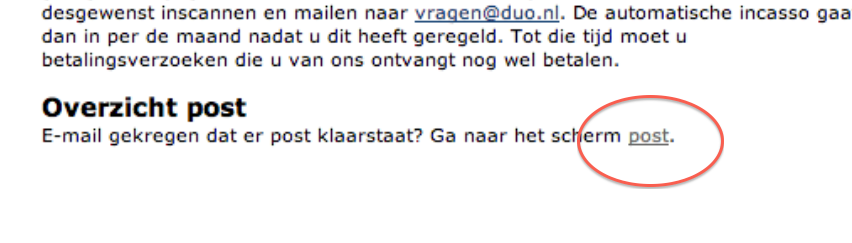
Zoekplaatje. Waar staat dat bericht? Juist:
Lekker vindbaar. Als je dan doorklikt krijg je eindelijk een PDF met dat bericht wat ze je ook gewoon hadden kunnen sturen.
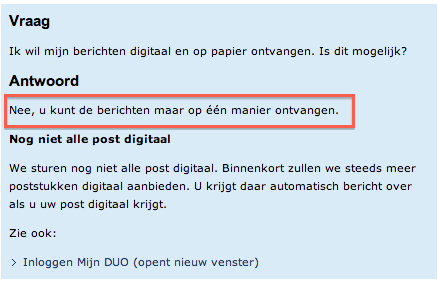
Ok. Weet je wat. Laat ze die brieven dan ook maar per ouderwetse post versturen. Dan hoef ik in ieder geval niet meer in te loggen om te lezen hoeveel geld ik dit jaar moet betalen aan Groningen. Maar wacht…
Lolwut? Dus je wilt me vertellen dat als er brieven worden verzonden het onmogelijk is om nog mailtjes te verzenden? Wie heeft dit idiote systeem gebouwd? Als ik zo de begroting mag geloven heeft DUO een jaaromzet van zo’n 231 miljoen euro per jaar. Daar kon toch wel een beter ICT-systeem van worden betaald?
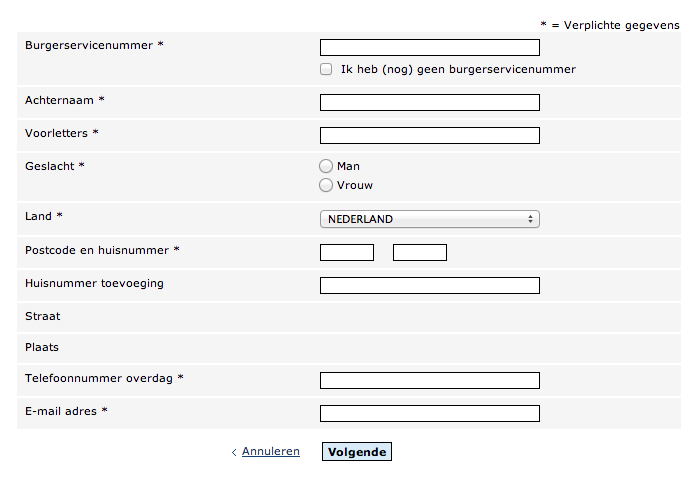
Ik heb het gehad! Ik ga een klacht indienen! Na tien keer klikken door het supportsystem van DUO krijg je dan dit:
Serieus gasten? Waarom moet ik mijn Burgerservicenummer en huisadres afstaan om te vertellen dat jullie website zuigt? Het is minder werk om een brief te sturen (of een blogpost te schrijven)!
Ik snap heus wel dat er vast goede redenen zijn waarom dit systeem zo slecht is. Maar, zoals ik al eens eerder schreef, de oplossing is niet om dan maar al die complexiteit bloot te leggen en het aan de klant over te laten om het op te lossen.
En waarom is dit nou belangrijk? Waarom word ik hier zo boos van? Die paar extra minuutjes die je extra moet spenderen omdat het systeem zo slecht is maken toch niet uit?
Echt wel. En als je het niet van mij wilt aannemen, dan maar van Steve Jobs. Want die vijf minuten van jou keer die miljoenen mensen die dit systeem gebruiken is mensenlevens vol van verspilde tijd die je ook had kunnen gebruiken, om, nou ja, bijvoorbeeld een goede website voor DUO te bouwen.
Naschrift: ik realiseer me dat DUO de PDF’s niet gelijk meestuurt omdat dat wellicht privacy gevoelige informatie bevat. Maar die redenatie zou op z’n minst moeten worden uitgelegd, of als keuze moeten worden aangeboden. Verder doet dat natuurlijk niks af aan de rest van de problemen die ik heb met de website. Dit is gewoon één onderdeel van de hele keten van onhandige onderdelen aan die website.
U bent het inmiddels van mij gewend: sinds 2004 zet ik op deze plek elk jaar een lijstje neer met de beste muziekalbums van het jaar.
2013 was een goed jaar. In tegenstelling tot 2011 en 2012 kon ik genoeg platen vinden om een lijstje mee te vullen en moesten er zelfs een paar afvallen om een top 20 te kunnen maken. Veel electronica, met een vleugje jaren-tachtig retro. Of zoiets. Eerlijk gezegd ben ik meer van het luisteren naar muziek dan er over te schrijven.
Bij deze dus. Als u Spotify heeft kunt u op het icoontje klikken om het album gelijk te luisteren. Ook heb ik een YouTube-mix toegevoegd met mijn favoriete twintig nummers van het jaar (scroll naar beneden voor die lijst). Tot 2014!
My Bloody Valentine – m b v
Kanye West – Yeezus
The Field – Cupid’s Head Zo goed als From Here We Go To Sublime wordt het uiteraard nooit meer, maar Cupid’s Head komt in de buurt.
Daft Punk – Random Access Memories
Oneohtrix Point Never – R Plus Seven
DJ Rashad – Double Cup
De Jeugd van Tegenwoordig – “Ja, Natúúrlijk!” Zo ongeveer een derde van de plaat is erg goed, een derde prima, en een derde compleet ruk. Maar genoeg goed dus voor een 7de plek.
Jon Hopkins – Immunity
Haim – Days Are Gone
James Blake – Overgrown
CHVRCHES – The Bones of What You Believe
Arcade Fire – Reflektor
Darkside – Psychic
Disclosure – Settle
The Knife – Shaking the Habitual
Kurt Vile – Wakin On A Pretty Daze
Phosphorescent – Muchacho
Lily & Madeleine – Lily & Madeleine Het is griezelig hoeveel Lily en Madeleine lijken op Johanna en Klara van First Aid Kit. Desondanks een prettig plaatje voor donkere winterdagen.
Savages – Silence Yourself
Vampire Weekend – Modern Vampires of the City De hekkensluiter. Zo’n beetje iedereen vond dit de plaat van 2013, maar eerlijk gezegd vond ik het zoals alle andere platen van Vampire Weekend: luistert prettig weg, maar na een paar keer heb je het wel gehad.
En nog even de tracks die je in de YouTube mix voorbij ziet komen, mijn favoriete losse tracks van 2013:
Naschrift: ontdek ik zowaar in mijn archieven dat ik deze lijstjes niet sinds 2004, maar zelfs al sinds 2003 jaarlijks maak. Een jubileum dus dit jaar. Hoera!