Ja, het is weer die tijd van het jaar. Wanneer kunt u het beste niet uw verjaardag vieren, of juist wél een goede detective kijken? Inderdaad, “onze jongens” spelen weer een WK. Hier alle tijden wanneer u het beste uw agenda kan blokkeren (om te kijken met uw vrienden) of wegkruipen in een hoekje (met die detective).
Vrijdag 13 juni 21:00 : Spanje – Nederland
Woensdag 18 juni 18:00 : Australië – Nederland
Maandag 23 juni 18:00 : Nederland – Chili
Mits Nederland tweede wordt in groep B:
Zaterdag 28 juni 18:00 : Achtste finale: Winnaar groep A – Nederland
Vrijdag 4 juli 22:00 : Kwartfinale: Nederland – Winnaar 1C / 2D
Dinsdag 8 juli 22:00 : Halve finale: Nederland – Winnaar kwartfinale
Mits Nederland eerste wordt in groep A:
Zondag 29 juni 18:00 : Achtste finale: Nederland – Tweede groep A
Zaterdag 5 juli 22:00 : Kwartfinale: Nederland – Winnaar 1D / 2C
Woensdag 9 juli 22:00 : Halve finale: Nederland – Winnaar kwartfinale
“De schoone slaapster in het bosch”, an interpretation of the story of Sleeping Beauty. From the collection of the Koninklijke Bibliotheek.
The past decade for libraries and archives have been hard. The ongoing digitisation of virtually everything that was once analog has led to confusion and soul searching for many of these GLAM’s (Galleries, Libraries, Archives and Musea): if their core mission is no longer about physical but virtual objects, what does it mean for their future?
At the same time, other initiatives have sprung up that compete with the traditional roles of these institutions. Wikipedia, being the 6th largest global website and the biggest reference work in the world, is perhaps the most important initiative in that respect.
It makes sense therefore to combine the two: why not have somebody from Wikipedia that can create a two-way relationship between the institution and the Wikipedia community?
I’ve been doing exactly that since october 7th as the first Dutch Wikipedian in Residence for the National Library (Koninklijke Bibliotheek, KB) and the National Archive (Nationaal Archief, NA). This blog post is a summary of what i’ve learned and encountered in those first two months.
Tone and focus
Together the National Library and National Archive have more than 220 kilometers of objects (that’s roughly the distance from Amsterdam to Brussels). That immediately raises the question: what small part of this huge collection should i focus on?
Fortunately i’m not the only one to decide. Together with collection specialists from both institutions, and many volunteers from Wikipedia i’m narrowing down the virtually endless list of options: among others, medieval illuminated manuscripts, historic maps and children’s picture books will all be part of some activity during my residency.
Evangelism and courses
Another important part of my residency here is the so-called ‘evangelism’ of all the concepts that float around Wikipedia: free licenses, no original research, ‘what is encyclopaedic?’, etcetera. In the two months that i’ve been working here more than 60 employees from the KB and NA have been following one of my five Wikipedia introductory courses where people learn both the ideas behind the encyclopedia and the practical side (how to edit).
Of course, i do not have the illusion that all of those 60 attendees will be full-time Wikipedia volunteers after a three-hour course, but it helps to create a sort of ‘baseline’ of common knowledge and goodwill. I don’t need to explain anymore why Wikipedia works the way it does after enough people have attended one of the courses.
Obviously, i do hope some people will become regular Wikipedia contributors. But for that, we’ll probably going to need some more ‘advanced’ courses (those will follow in the beginning of 2014). Still, we have some promising results after four workshops. Since i started here on October 7th, more than 170 edits have been made by people who attended one of the courses. 84 individual articles have been edited or created by KB/NA employees since i started here as a direct result of these courses.
Contact with Wikipedians
Wikipedians Ronn and Effeietsanders at the National Archive.
Apart from giving courses to employees one of my other tasks is getting in contact with any Wikipedians that want to use the resources and objects in the KB/NA collection.
Wikipedians Ronn and Effeietsanders (see photo) are working on improving all the articles related to the States-General (the Dutch legislature). Both the KB and NA have important documents related to the history of the States-General (going back to 1464) , and i was happy to help them with finding documents and directing their specific questions to the specialists about this subject.
Another nice example of how i’m working together with Wikipedians: a user asked for photos of the Wire of Death, a lethal electric fence on the Dutch-Belgian border during the First World War. Spaarnestad Photo, that resides in the building of the National Archive, has the copyright on seven of these photographs. I asked if they would be willing to release these photos (in low resolution) under a CC-BY-SA license, and fortunately they did. I don’t the think the user would have had any success without an intervention by somebody who worked next door to the Spaarnestad managing director.
Another way for Wikipedians to explore the collection of the KB & NA will be during the Wikimedia New Year’s Reception, which will be held at the institutions on January 18th 2014. A nice time to present some of the results of the WiR program as well.
The future
For now i’m focusing on finishing the last course for employees. Where the last three months of 2013 were about looking inside, 2014 will be about looking behind the walls of the archive and library. I’ll be organising edit-a-thons for anyone that wants to use the collections of the KB and NA to expand Wikipedia articles. I will also be coordinating uploads of media files to Wikimedia Commons, and maybe even some data dumps for Wikidata.
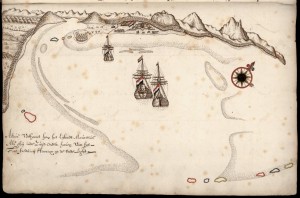
Map from the journal of Abel Tasman from the National Archive (number 1.11.01.01, inv.nr. 121)
The biggest event will be something i’ve tentatively called Wiki Loves Maps: a full month of events dedicated to maps, cartography and the historic places and events that are depicted on those maps.
The KB and NA have wonderful highlights in their collection, but for this project i want to look outside The Hague towards my peers. During my two months of residency three more Dutch Wikipedians in Residence have been announced: Hans Muller and Arie Sonneveld for the Scientific Library Working Group (WSWB) and Sandra Fauconnier for the Tropenmuseum and Academic Heritage Foundation (Stichting Academisch Erfgoed). All of their institutions have wonderful maps as well, and it would be silly not to use the opportunity of four WiR’s at the same time to organise something together. Besides that, the Dutch bookweek in March has travel as its theme this year, so that seems like a natural fit.
If you have any comments or remarks please share them (anonymously) in the comments. And share this article on Facebook, Twitter, or your favourite social network.
You might know this problem: for some reason Akismet didn’t quite work and now you have this old WordPress blog with thousands of spam comments. Of course, you could try the ‘Check for spam’ button in the comments panel, but that might not work for every comment.
So here’s a little guide to help you fix this problem easily using phpMyAdmin (which is probably already installed on your server) and some SQL magic.
Warning: you want to make a backup of your database first before using this guide, in case you accidentally delete more stuff than you want.
Okay, let’s get started! First, log into phpMyAdmin and locate the WordPress database (it’s probably called ‘wp’ or ‘wordpress’). From the left-hand column select the ‘wp_comments’ table, and then on the top, click the ‘Search’ button.
In this new screen look for the ‘comment_author_url’ field. From the ‘operator’ dropdown there select the ‘LIKE %…%’ option and enter ‘http’ in the value field. Now press search.
In my experience virtually all spam uses the ‘website’ field to link to their spam site. This list might also include valid comments. If that’s the case but you’re sure you haven’t had a lot of comments in the post few months you could check for the last ‘valid’ comment, note the ‘comment_ID’ and add that to the search as well (use the > operator in the search tab). Otherwise..it’s either bad luck for those people or you need to weed out all the valid comments by hand…
So, now you’ve got this whole list. To delete them simply press the ‘edit’ link underneath the SQL statement on top of the page. It will probably look something like this:
SELECT * FROM `wp_comments` WHERE LIKE '%http%'
Change the SELECT * into DELETE so it looks like this:
DELETE FROM `wp_comments` WHERE LIKE '%http%'
You’ll get a warning because you’re gonna delete stuff. Press OK and all those pesky comments will be gone!
If this guide was helpful to you feel free to share it on Twitter or Facebook or leave a comment here.
Here’s an interesting problem i recently encountered.
I’ve got a site using Require.js. I’m loading an external library that doesn’t use Require. This library loads some external dependencies, one of them being Mustache.js. This library doesn’t use Require for loading dependencies, but a simple system of inserting <script> tags with a src tag.
See the problem? Because i’m using Require this module exports itself using the define() call. However the external library i’m using expects its to be in global scope so doing
Mustache.render()
Won’t work.
Actually, for some weird reason (maybe something with lazy loading and evaluating JS?) this seems to work in Chrome, but on the iPad it fails.
So, who’s wrong here? Should the UMD definition be redefined to always export a global variable? Or is the external library just ‘doing it wrong’ and should they not use an external library like this?
Unfortunately there’s no clearcut answer to that. For now, i see three different ways to fix this.
Load the UMD module before Require in a script tag
So, do something like this:
    <script src="http://example.com/mustache.js"></script>
    <script src="http://example.com/require.js"></script>
    <script>
        // Mustache will be available before Require, and will attach itself
        // to the global scope.
        var html = Mustache.render();
    </script>
Load the UMD module with Require, but re-attach to the global scope
This is a bit hacky, but maybe a better solution than having a seperate script tag.
    // First load the UMD module dependency and attach to global scope again
    require(['/example/mustache'], function(Mustache) {
        window.Mustache = Mustache; // re-attach to global scope

        // Now load the problematic module
        require(['/example/module'], function() {
            // This module can use Mustache as a global variable
        });
    });
Change the UMD definition
I guess this is only interesting if the problematic dependency is also under your control, but you could change the UMD definition to something like this:
Apparently defining ‘dynamic’ content in a class doesn’t work.
The solution: either add the array in the constructor:
class Say {
    private $fns;

    function __construct() {
        $this->fns = [
            "hello" => function($name, $name2 = false) {
                echo empty($name2) ? "Hello $name" : "Hello $name and $name2";
            },

            "bye" => function($name) {
                echo "Bye $name";
            }
        ];

        foreach ($this->fns as $fn) {
            call_user_func_array($fn, func_get_args());
        }
    }
}

$say = new Say("foo");
$say = new Say("foo", "bar");
Or (slightly better in terms of readable code) define the functions in the class and reference them from the array
class Say {
    private $fns = ['hello', 'bye'];

    function __construct() {
        foreach ($this->fns as $fname) {
            $fn = array($this, $fname);
            call_user_func_array($fn, func_get_args());
        }
    }

    public function hello($name, $name2 = false) {
        echo empty($name2) ? "Hello $name" : "Hello $name and $name2";
    }

    public function bye($name) {
        echo "Bye $name";
    }
}

$say = new Say("foo");
$say = new Say("foo", "bar");
Et voila, a nice way to write flexible PHP!
BONUS: if you don’t want to write out all the methods by hand in the $fns array you could use this dirty trick to get all function names in the class without the ‘magic’ methods like __construct and __autoload:
class Say {
    function __construct() {
        $fnames = array_filter(get_class_methods($this), function($name) {
            return $name[0] != "_";
        });

        foreach ($fnames as $fname) {
            $fn = array($this, $fname);
            call_user_func_array($fn, func_get_args());
        }
    }

    public function hello($name, $name2 = false) {
        echo empty($name2) ? "Hello $name" : "Hello $name and $name2";
    }

    public function bye($name) {
        echo "Bye $name";
    }
}

$say = new Say("foo");
$say = new Say("foo", "bar");
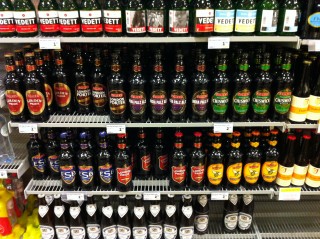
Ze hebben tegenwoordig Britse speciaalbieren bij de Jumbo op de Westerstraat in Amsterdam, midden in het hartje van de Jordaan. Leuk, maar hoe moet je daar een keuze uit maken, zonder dat je ze allemaal hoeft te kopen?
Geen nood, want ik ben zo’n nerd die dan foto’s maakt van alle bieren, de waarderingen en alchoholpercentages opzoekt op het geweldige BeerAdvocate en ze dan vervolgens als een lijstje op z’n website post.
Voor wie lui is: koop Flying Dog Gonzo, Fuller’s ESB en Fuller’s London Porter.
I’ve just released version 0.7.0 of Stapes.js, my MVC Javascript microframework. A big change in this release is the deprecation of the create method and the introduction of the new subclass method.
Why the change? The old system worked nicely for single modules, but was broken when trying to create an extension hierarchy. In the old system the creation of a class and the instantiation of that class were the same thing. In really simplified code that looked something like this:
The main problem with this approach is that every property that has been added to Animal after the initial create will become part of the prototype of Dog as well. Even if those properties are instance properties (e.g. Animal.bark = true instead of Animal.prototype.bark = true). This lead to difficult to detect bugs and behaviour.
constructor will become the function that is being called when making an instance with new. All other methods in the object will become part of the class prototype.
The new Module is just a standard Javascript class, so you can add prototype properties using Module.prototype or static properties using direct assignment. Stapes has two convenience methods for this called extend and proto that allow you to quickly add an object of properties to the prototype or directly to the module.
Inheritance can be done by simply calling subclass on a newly created class. The instanceof operator now works correctly too:
Every module now gets a parent property, referencing the parent’s prototype. You can use this to still call a parent method if you’ve overwritten it.
Note that for backwards compatibility the create method on the Stapes global will still work. However, because of the obvious problems it won’t work anymore on submodules. In the future i’ll remove Stapes.create. If you like the old style i recommend you switch to something like var module = (Stapes.subclass()).extend() which is more or less the same as the old Stapes.create().extend() pattern.
So, that’s it. Please leave any questions and remarks in the question section below or file tickets on Github.
Juist, het is weer die tijd van het jaar. Het einde van het jaar betekent: een lijstje, met de beste albums van het jaar. Het ultieme muzieknerd-ding.
2012 was wat mij betreft geen al te best jaar. Ik heb een hoop geluisterd, maar er was weinig wat er echt enorm uitsprong, veel dingen die zo-zo waren. Weinig verrassends. Maar misschien word ik ook wel oud en ben ik niet meer zo van de nieuwe muziek.
Net zoals voorgaande jaren heb ik bij alle albums die op Spotify beschikbaar zijn een icoontje gezet waar je direct op kan klikken, en heb ik een YouTube mix gemaakt met de beste nummers van elk album. Veel luisterplezier en een mooi 2013!
Daar zijn we weer. De Lijst. Voor de eerste keer heb ik naast een lijst met beste muziekalbums ook een lijst gemaakt met mijn favoriete films van het jaar. Voor een volledige lijst van alle films die ik dit jaar heb gezien klik hier. Ik heb zowel documentaires als fictie op de lijst staan.
For those who want to detect if a (touch) browser supports the overflow-scrolling property for ‘native style momentum scrolling’ i’ve written a little script that doesn’t need any dependencies like Modernizr.